Google Wants Your Phone to Think for You. Here Is Everything They Announced
The Android Show happened on Tuesday and there is a lot to unpack, but if we tried to summarise it in one word it would be Gemini. A big part of the event was focused on AI, and Google even said Android is transitioning from an operating system to an intelligence system
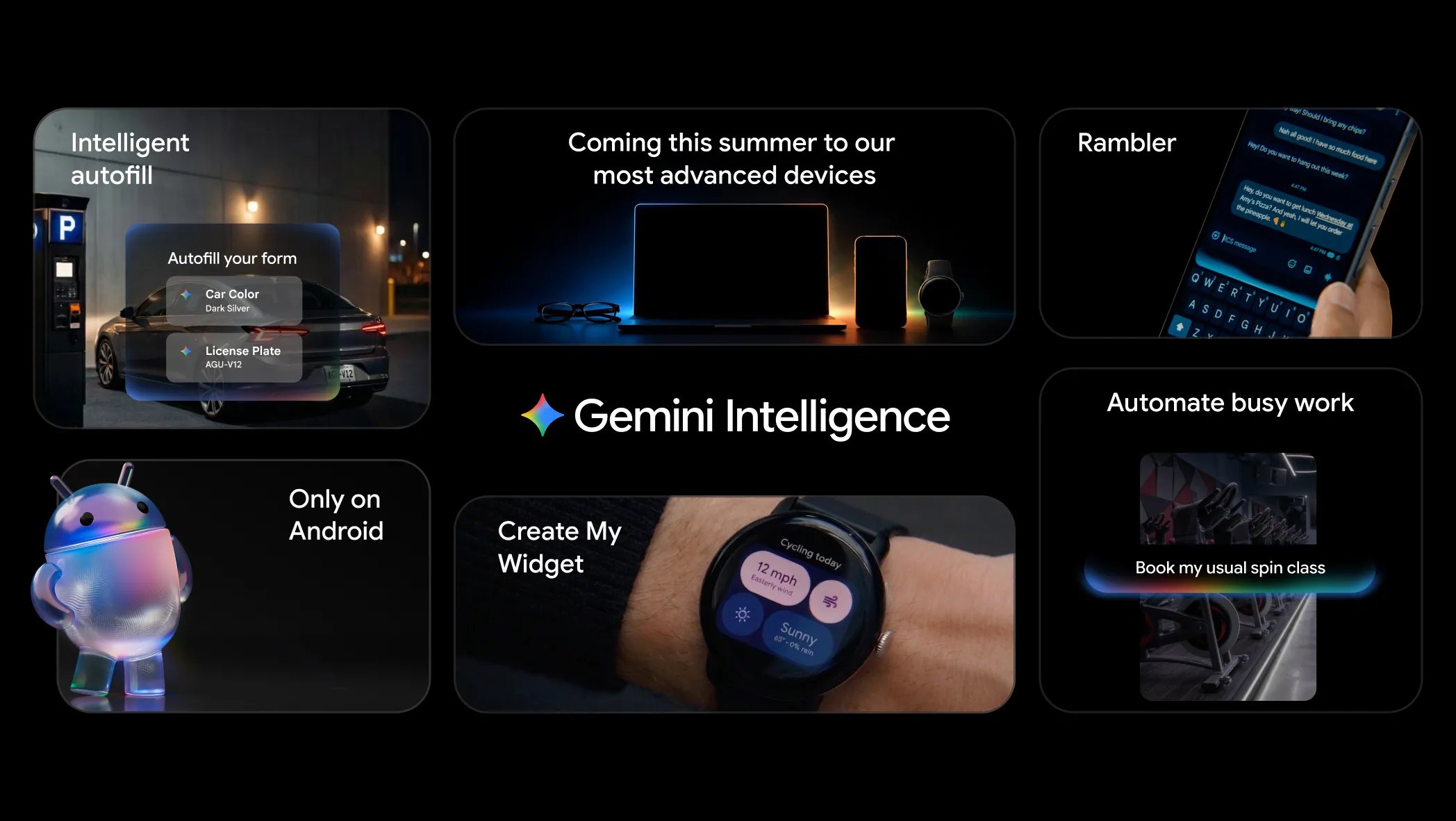
The Android Show happened on Tuesday and there is a lot to unpack, but if we tried to summarise it in one word it would be Gemini. A big part of the event was focused on AI, and Google even said Android is transitioning from an operating system to an intelligence system. Google is strongly pushing in the direction the rest of the tech world seems to be going, that is for sure, but the average user does not seem to care about this direction yet, though sometimes the average user does not know what they want, so who knows? they might be on to something. I personally have mixed feelings about it, but one thing I am sure about is that there are a lot of positives. This article will not go in-depth on all the AI features announced, but instead touch on everything announced at the event.
Image credit Abhishek Yadav
Pause Point
The struggle with controlling screen time is real. I recently had to uninstall TikTok because it was getting distracting, and there are times I have uninstalled Twitter too. We all have some apps we would like to spend less time on. Pause Point is a new digital wellbeing feature coming with Android 17 to help you better manage your screen time and app usage, in addition to tools like App Timer that already exist. It works by giving you a moment to pause before you open an app you have marked as distracting. You can also add other apps it can redirect you to, or photos to remind you of what is important, so you remember to stay focused.
I already have ideas for how I would use this feature, and I have a feeling it will be effective for people trying to cut down on general screen time or specific apps. Even if you still decide to use the app after Pause Point, you are likely going to be more goal-oriented with it instead of getting lost and forgetting why you opened it. It should be a solid productivity feature.
Quick Share and AirDrop Compatibility
This is not exactly new news, as the Pixel 10 series and recently the Pixel 9 and Galaxy S26 series already have it, but the support is expanding, which is good news. It likely means Apple is not shutting the whole thing down, as some people suspected when it first arrived. It will be coming to some older flagships across several top brands. Hopefully it gets gradually rolled out to everyone with the hardware and software capability for it.
Create Your Own Widget
It is exactly what it sounds like. You can now just talk to your Android phone, describe the widget you want, and it will vibe code it for you. As someone who has paid for widgets before, I think this is pretty neat, but it must be horrible news for developers who build custom widgets for a living. For the rest of us though, it is a very nice addition.
Rambler
Android already has one of the best speech dictation tools available, and this update takes it a step further by using AI to better understand exactly what you want to communicate in a dictation and intelligently remove any rambling. For example, if you are dictating and you say “Damn, I would really love it if Arsenal lost both the EPL and the Champions League, uhh wait, have they even won the Champions League before? Umm, nah obviously not, anyways it is looking very unlikely,” it will intelligently identify what was an audible internal dialogue that became a ramble and remove it, giving you “Damn, I would really love it if Arsenal lost both the EPL and the Champions League, but it is looking very unlikely.” This would be very useful for people who use voice typing a lot, or for situations where you cannot type properly.
Gemini Intelligence
Google is giving Gemini the capacity to act as agentic software, allowing it to pull data from across your device to give it better context and ability. An example would be it pulling your NIN data from a photo you took of your NIN card and using it to help you fill forms, or giving it a task like planning a trip and having it go through multiple apps doing everything needed to finish what you have assigned it. The biggest hurdle for many people will be deciding what exactly they trust AI to do for them, but if these features work as they showed, they should gradually earn that trust as more people come onboard.
Googlebooks
Google announced a new line of laptops to replace Chromebooks by merging ChromeOS and Android into a new experience on PC. It is supposed to be better than what Chromebooks currently are, and just like Chromebooks, it will not be a Google hardware-only thing. Top laptop manufacturers will be making their own Googlebooks based on Google’s software platform. They will have to put in a lot of work if this is to compete with the MacBook Neo, but it promises better AI capability on PC, which is not hard to deliver because the bar on PC AI is currently low. One thing they showed that was exciting is the ability to turn your cursor into a sort of magic highlighter with capabilities similar to Circle to Search on mobile, along with other AI features.
Long Story Short
There were some other interesting things they showed, including more AI features, quality of life updates, better integration with apps like Instagram, redesigned emojis, a better way to move your iPhone data to your android device, better media editing capabilities, and updates to Android Auto, which is Android’s platform for cars, receiving a lot of attention and visual improvements. Google I/O itself happens on May 19 and 20, and if anything else comes out of it that I think you will find interesting, I’ll make sure it get to your mail. I’d like to hear what you think about these updates, if you are an android user, does anything excite you? and if you use an iPhone is there anything here you will like to see come to iOS? Let me know in the comments